
9K Club Game – 9K Club Download Apk, Register, Login & Get ₹900 Gift Code
9k club Game is an online gaming platform that has attracted attention among users looking for quick access to different games, account features, and promotional offers. New users usually want to know how to register, where to find the 9k club download, how to log in, and whether a ₹900 gift code is available.
This guide explains the basic process in simple language. Before using any online gaming platform, users should check the applicable age requirements, terms, payment rules, and local laws.
Explore Casino Games
What Is 9k Club?
The 9k club game platform is presented as an online gaming service where users can create an account and explore the games available through the platform. Depending on the current version or website, the available features and promotions may change.
For beginners, the first step is usually creating an account. After registration, users can use their login details to access their account and explore the platform.
It is also important to use only the genuine website or official source when downloading an application. Avoid APK files shared through unknown websites or random social media links.
9K Club Download APK
Follow these steps to verify the APK source and review installation requirements before installing the application.
Before You Download
Multiple websites may use similar gaming names. Verify the website, app publisher, and download source before proceeding.
How to Download and Install 9K Club APK
Open the Website
Open Chrome or another trusted browser on your Android phone. Visit the website you have independently verified as the intended 9K Club service.
Verify the Download Source
Check the website address and confirm that the download page belongs to the intended service. Avoid unknown websites, forwarded files, and unofficial links.
Download the APK
If a legitimate download option is available, tap the download link and wait for the file to finish. Check your phone’s Downloads folder.
Review Installation Permissions
Verify the publisher and review the requested permissions. Do not bypass Android security warnings for an unverified application.
Install the Application
Open the downloaded file only after checking its source. Review the installation details and proceed only if you trust the application.
Open the App
After installation, check whether Login and Registration options are available. Follow the platform’s instructions if you choose to create or access an account.
Stay Safe While Gaming
Follow applicable age and legal requirements for real-money gaming. Set a spending limit and never use money needed for essential expenses.
How to Install and Update the App?
After downloading the application from a trusted source, follow the installation instructions shown on your device.
For future updates, use the platform’s official update method whenever possible. Do not install random APK updates simply because they promise new features, bonuses, or faster payouts.
Keeping the application updated can provide better compatibility, bug fixes, and security improvements.
9K Club App Compatibility and Device Requirements
Before installing the 9K Club app, check whether your phone meets the application’s basic requirements.
Important things to check include:
- Supported Android or iOS version
- Available storage space
- Stable internet connection
- Updated browser or operating system
- Screen compatibility
- Required app permissions
Using an updated device and application can also help reduce crashes and loading problems.
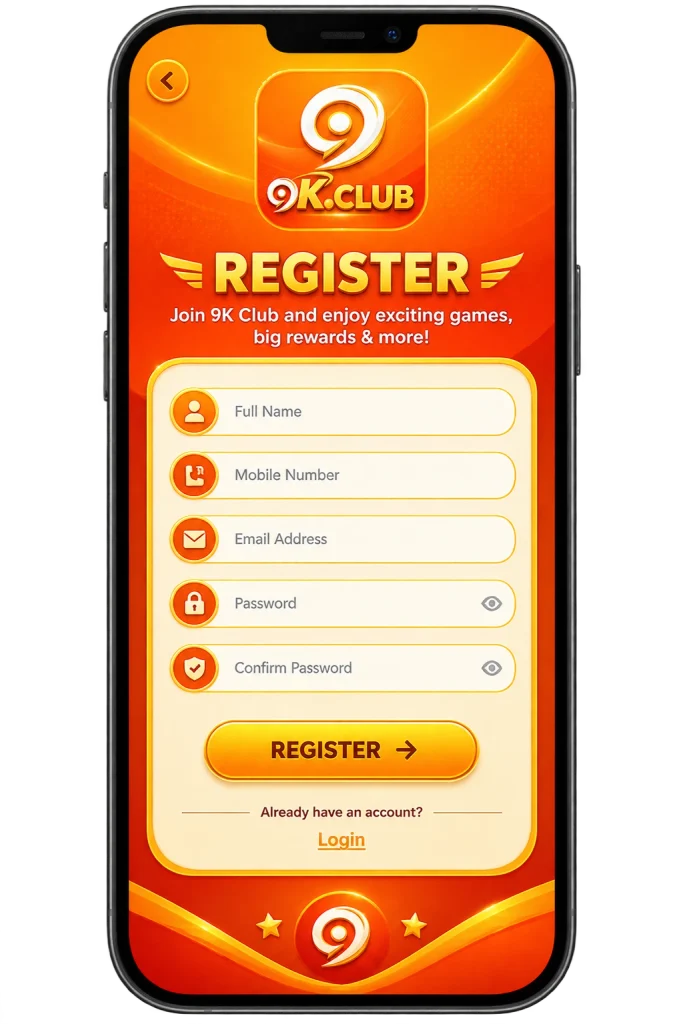
9K Club Register Process For New Users
New users may need to register before accessing account-specific features. The exact registration fields depend on the current platform version.
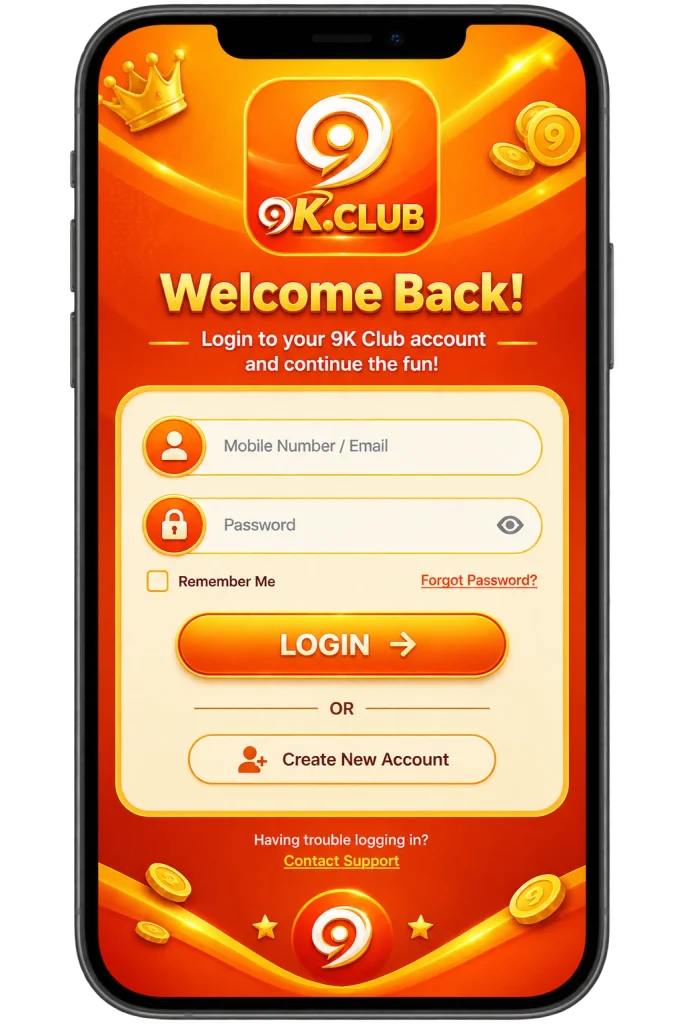
9K Club Login: How to Access Your Account?
Registered users can access their accounts through the available login page.
Steps to Log In to 9K Club
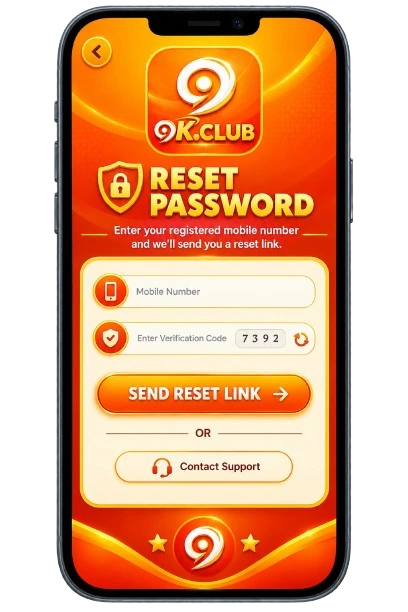
How to Reset a Forgotten 9K Club Password?
If you forget your password, check whether the current login page offers a password recovery feature.
Password Recovery Steps
- Open the 9K Club login page.
- Select Forgot Password or the available recovery option.
- Enter the mobile number or account identifier associated with your account.
- Complete the requested verification process.
- Enter the latest OTP if one is required.
- Create a new, strong password.
- Return to the login page and sign in using the updated password.
What to Do If You Do Not Receive an OTP?
- Confirm that the registered mobile number is correct.
- Check your mobile network and SMS inbox.
- Review blocked or filtered messages.
- Wait for the resend timer before requesting another code.
- Contact the platform’s verified support channel if the issue continues.
Avoid creating a second account simply because you cannot access your original one. Never share an OTP or password with anyone claiming they can recover your account.
Troubleshooting 9K Club Login Problems
If your 9k club login is not working, try these quick fixes:
- Check your username/mobile number and password.
- Make sure your internet connection is stable.
- Refresh the login page or restart the app.
- Clear your browser cache and cookies.
- Try another updated browser or device.
- Use Forgot Password if you cannot remember your password.
- If OTP is not arriving, check your mobile network and wait before requesting another OTP.
- Update the app if a newer version is available.
- If the website is down, wait and try again later.
- Contact official support if the problem continues.
Never share your password or OTP with anyone claiming to fix your account.
Main Features of 9K Club
The features available on 9K Club may vary by version and account status. Common platform features to look for include the following.
1. Game Selection
An organized gaming interface can help users browse available game categories and open the sections they want to explore.
2. Mobile-Friendly Interface
A mobile-oriented design can make it easier to access account options, browse games, and review information using a smartphone.
3. Account Access
Login and registration features allow eligible users to access their accounts and manage their account information.
4. Simple Navigation
Clearly organized menus can help users locate available games, account settings, wallet information, and promotional sections.
5. Account Management
Where supported, account management tools may include profile details, password settings, transaction history, and security options.
6. Promotional Information
Users can review the offers displayed on the current platform and check the relevant eligibility rules before participating.
9K Club ₹900 Gift Code: How to Claim?
A ₹700 9K club gift code should not be considered a guaranteed reward unless the current platform displays a valid offer with clear terms.
General Gift Code Claim Process
- Log in to your existing 9K Club account.
- Look for a Gift Code, Rewards, Promotion, or similar section.
- Check whether a ₹700 offer is currently available to your account.
- Read the eligibility conditions, expiry date, and any applicable restrictions.
- Enter the gift code exactly as provided, if required.
- Submit the code and wait for the displayed result.
- If the reward is accepted, check the account’s reward or transaction history.
If no valid offer appears, do not assume that a code advertised on another website will work. Avoid paying an advance fee to claim a supposed gift or bonus.
9K Club Bonus and Promotion Offers
Promotional offers can change according to the platform, campaign period, account eligibility, and applicable terms. Users should rely on the current promotion page rather than an unverified bonus list.
Possible promotional categories to check include:
- Welcome offer: A promotion for eligible new users, if available.
- First deposit offer: A promotion associated with a qualifying first deposit.
- Additional deposit offers: Campaigns that may apply to subsequent deposits.
- Gift codes: Codes distributed through eligible promotional campaigns.
- Recharge offers: Promotions that may apply to qualifying wallet transactions.
- Referral rewards: Offers subject to referral eligibility and tracking conditions.
- Winstreak promotions: Rewards that may depend on specified consecutive results, if offered.
What to Check Before Claiming a Bonus
Review the minimum qualifying amount, expiry date, eligible games, withdrawal restrictions, wagering or turnover conditions, and maximum reward limits.
A displayed bonus may not be equivalent to withdrawable cash. Do not deposit money solely to unlock an advertised reward unless you understand the conditions and can afford the potential loss.
9K Club Payments: Deposits, Withdrawals and Processing
Payment features depend on the specific service, account, region, and current wallet settings. Do not assume that every payment method or processing time mentioned by a third-party website applies to 9K Club.
How to Make a Deposit?
If the platform offers a deposit feature, the general process may be:
- Log in to your account.
- Open the Wallet, Deposit, or Add Money section.
- Review the available payment methods.
- Check the displayed limits, fees, and transaction requirements.
- Enter the amount you intend to deposit.
- Follow the payment instructions displayed for that transaction.
- Save the payment reference and check the transaction status.
Use only verified payment instructions. Do not rely on old screenshots, forwarded QR codes, or payment details sent by unknown individuals.
9K Club Payment Methods
The available methods must be confirmed in the current account. Depending on the service and region, online platforms may support options such as:
- UPI or other supported instant payment services
- Bank transfers
- Cards
- Supported digital wallets
Do not assume that any of these methods is currently available on 9K Club without checking the live payment page. Be particularly cautious about requests to transfer money to a personal account.
9K Club Withdrawal Process
If a withdrawal feature is available, check the account’s withdrawal rules before submitting a request.
- Log in to your account.
- Open the Withdrawal section.
- Check your available withdrawable balance.
- Review the minimum and maximum withdrawal limits.
- Select an available withdrawal method.
- Enter the receiving details carefully.
- Complete any required account verification.
- Submit the request and save the transaction reference.
- Monitor the withdrawal status in your account.
Bonus balances and pending transactions may be subject to separate conditions. Confirm the applicable rules before requesting a withdrawal.
How Long Do Withdrawals Take?
Processing times can differ by payment method and service. Check the estimated processing period shown when submitting your transaction rather than relying on an advertised universal timeframe.
A pending status does not necessarily mean that a transaction has failed. If a request remains unresolved beyond the stated processing window, retain the transaction reference and contact the relevant verified support channel.
What If a Deposit Is Deducted but Not Credited?
If your bank or payment application shows a completed payment but the platform balance has not updated, avoid immediately making a second payment.
Instead:
- Check the transaction status with your payment provider.
- Save the UTR, RRN, or other transaction reference.
- Compare the payment amount and timestamp with the wallet record.
- Review the stated processing window.
- Contact the relevant support channel if the issue remains unresolved.
Never disclose your payment PIN, password, or OTP to someone claiming they can release a pending transaction.
How 9K Club Results and Payouts Work?
Prediction-based games may display outcomes by round, period, or game identifier. When checking a result, match the displayed identifier with the entry you submitted.
How to Check Game Results
- Log in to the account.
- Open the relevant game.
- Find the Results, History, or Records section.
- Locate the round or period you participated in.
- Match the period identifier with your submitted entry.
- Review the displayed outcome.
- Check your account history for any corresponding settlement.
Checking the period identifier can help prevent confusion when several rounds take place close together.
How Are Payouts Calculated?
Payouts depend on the particular game, selection, amount entered, and the rules displayed for that game. Different games may use different payout structures.
Always read the specific rules before participating. A previous winning result does not guarantee a future win, and historical results cannot reliably establish what the next outcome will be.
Understanding Results and Wallet Records
A displayed game result and a wallet transaction are separate records. If the result appears but the balance has not changed, review the entry status and transaction history before taking further action.
Check these details:
| Record | What to Verify |
| Period ID | Does it match your submitted entry? |
| Entry | Was the selection successfully recorded? |
| Result | What outcome does the platform display? |
| Entry status | Is it accepted, pending, or cancelled? |
| Wallet history | Is the corresponding settlement recorded? |
9K Club Account Verification and Security
Account verification may be required to protect an account or access certain functions. The exact process depends on the current platform and the activity being performed.
How to Complete Account Verification?
- Log in to your existing account.
- Open the Profile, Account, or Security section.
- Check whether verification is required.
- Review the information requested.
- Complete the available OTP or other verification process.
- Submit the information through the verified platform interface.
- Wait for the confirmation or status update.
Only provide identity or financial information when necessary and through a verified, secure channel.
Account Security Tips
- Create a strong, unique password.
- Never share your password or OTP.
- Avoid logging in on public or shared devices when possible.
- Verify the website address before entering account details.
- Avoid suspicious links sent through messages or social media.
- Keep your phone and browser updated.
- Review account and transaction activity regularly.
- Log out after using a shared device.
9K Club Color Prediction: How to Play
Color prediction is a type of game in which participants select from the options provided for a particular round. Availability, selection rules, and payout conditions must be checked on the current platform.
Steps to Use the Color Prediction Feature
Step 1: Log In
Open the verified 9K Club service and access your account.
Step 2: Find the Game
Look for a section labelled Color Prediction or a similar name among the available games.
Step 3: Select a Round
Review the current round or period identifier. Make sure you understand when entries close.
Step 4: Review the Available Colors
Check which colors or other selections are offered and read the rules for that particular game.
Step 5: Review the Amount
If the game involves real money, check the permitted entry amount and decide whether participating fits your budget.
Step 6: Confirm Your Entry
Before submitting, verify the selected option, round identifier, and amount.
Step 7: Check the Result
After the round closes, review the displayed outcome and compare it with your recorded entry.
Step 8: Review Your Account History
If a settlement is recorded, check the corresponding wallet entry and transaction status.
Can Color Prediction Results Be Guaranteed?
No prediction method can guarantee the outcome of a future round in a random or independently generated game. Previous results, color patterns, and online prediction claims should not be treated as reliable guarantees of profit.
Participate only after reviewing the rules and financial risks.
How the 9K Club Referral Program Works?
If a referral program is available, registered users may be able to share an invitation link or code with eligible new users.
General Referral Steps
- Log in to your 9K Club account.
- Look for Refer & Earn, Invite, or Referral.
- Copy the referral link or code provided by the platform.
- Share it with someone who wants to register.
- Ensure the new user follows the applicable registration instructions.
- Review any required verification or qualifying conditions.
- Check the referral dashboard for the status of the invitation and any eligible reward.
What Can Affect Referral Rewards?
Referral rewards may depend on more than a link being clicked. Depending on the program, conditions could include successful registration, verification, or other qualifying activity.
| Referral Stage | What to Check |
| Link or code | Was the correct referral information shared? |
| Registration | Did the new user register through the eligible source? |
| Verification | Were the required verification steps completed? |
| Eligibility | Were all stated qualifying conditions met? |
| Reward | Does the dashboard show an eligible reward? |
| Tracking | Is the referral status recorded correctly? |
Read the current referral terms carefully. Do not create duplicate accounts or misrepresent referral activity to qualify for a reward.
Common 9K Club Login Problems and Solutions
Users may experience login difficulties because of incorrect credentials, network issues, verification requirements, or temporary service problems.
1. Forgotten Password
Use the available password recovery process and follow the verification instructions.
2. Incorrect Login Details
Check your registered mobile number, username, and password. Remember that passwords may be case-sensitive.
3. OTP Not Received
Verify the registered number, check network coverage, and wait for the resend timer. Avoid sharing any received code.
4. Website Not Loading
Check your internet connection, refresh the page, or try another trusted browser. Avoid installing files from alternative websites simply because the usual page is unavailable.
5. Application Not Opening
Check whether the device is compatible and whether the application came from a trustworthy source. Do not disable security protections to force an unverified application to run.
6. Temporary Maintenance
If the service is undergoing maintenance, wait and check for a verified service update.
7. Account Access Restricted
Follow the official account recovery or support process. Avoid creating additional accounts to bypass an account restriction.
Responsible Gaming and Account Safety
Online gaming and real-money prediction activities can involve financial losses. No bonus, referral scheme, color selection, or historical pattern guarantees a profit.
Keep these precautions in mind:
- Set a strict spending limit before participating.
- Never borrow money to fund gaming activity.
- Do not chase losses by increasing your entries.
- Avoid promotions that require payments to claim supposed guaranteed rewards.
- Verify the service and payment recipient before sending money.
- Keep passwords and OTPs private.
- Stop if gaming begins affecting your finances or daily life.
Explore DM Play to learn more about its login process, registration steps, app download, available games, and the latest bonus offers for new users.
Frequently Asked Question
How do I register on 9K Club?
Visit the platform’s verified website or use its verified app, if available. Follow the registration instructions, enter the required details, and complete mobile verification if prompted. Review the terms before creating an account.
Why is my 9K Club login not working even though my password is correct?
Login issues may result from server problems, an outdated app, incorrect account details, or temporary account restrictions. Check your internet connection, update the app if applicable, and use the official password recovery option if necessary.
What should I do if my 9K Club deposit is deducted but the balance is not updated?
Check your transaction history and allow some time for the payment status to update. Keep your transaction ID and payment receipt. If the balance remains unchanged, contact official support and your payment provider. Avoid making another deposit until the issue is resolved.
Why is my 9K Club withdrawal still pending?
A withdrawal may be pending because of payment processing delays, account verification requirements, or technical issues. Check the withdrawal status and stated processing time. If the delay continues, contact official support with your transaction reference.
Why is my 9K Club gift code showing as invalid?
A gift code may be invalid because it has expired, was entered incorrectly, has already been used, or does not meet the promotion conditions. Check the code, expiry date, and eligibility requirements before trying again.
Can I withdraw a 9K Club bonus immediately after receiving it?
Not necessarily. Bonus funds may be subject to wagering requirements, eligibility conditions, or withdrawal restrictions. Review the applicable bonus terms before attempting a withdrawal. A promotional balance may not be equivalent to withdrawable cash.
What should I do if the 9K Club APK is not installing on my phone?
Check your phone’s available storage and whether the file is compatible with your device. Download apps only from verified sources. Avoid APK files from unknown websites because they may contain harmful software. If the issue continues, contact official support.
Why am I not receiving the 9K Club OTP?
An OTP may be delayed because of network problems, an incorrect mobile number, SMS filtering, or a temporary service interruption. Verify your number, check your messages and spam filters, and request another OTP after the recommended waiting period. Never share your OTP.
Why does my 9K Club account show an incorrect wallet balance?
An incorrect balance may result from pending transactions, delayed updates, bonus restrictions, or a display issue. Refresh your account and review the transaction history. If the discrepancy remains, save the relevant details and contact official support before making further financial transactions.
How can I check whether a 9K Club promotion is still active?
Check the promotion details on the platform’s verified website or app, if available. Review the expiry date, eligibility conditions, and terms. If the information is unclear, confirm the promotion’s status with official support before participating.